Dashboard
This dashboard is designed for operational tracking of key performance indicators of the partner on the excursion booking platform. It allows the agency to monitor revenue, number of bookings and guests, as well as to see information about payments and commissions. The section helps to analyse the effectiveness of tours, track popular offers and manage financial settlements with the platform.
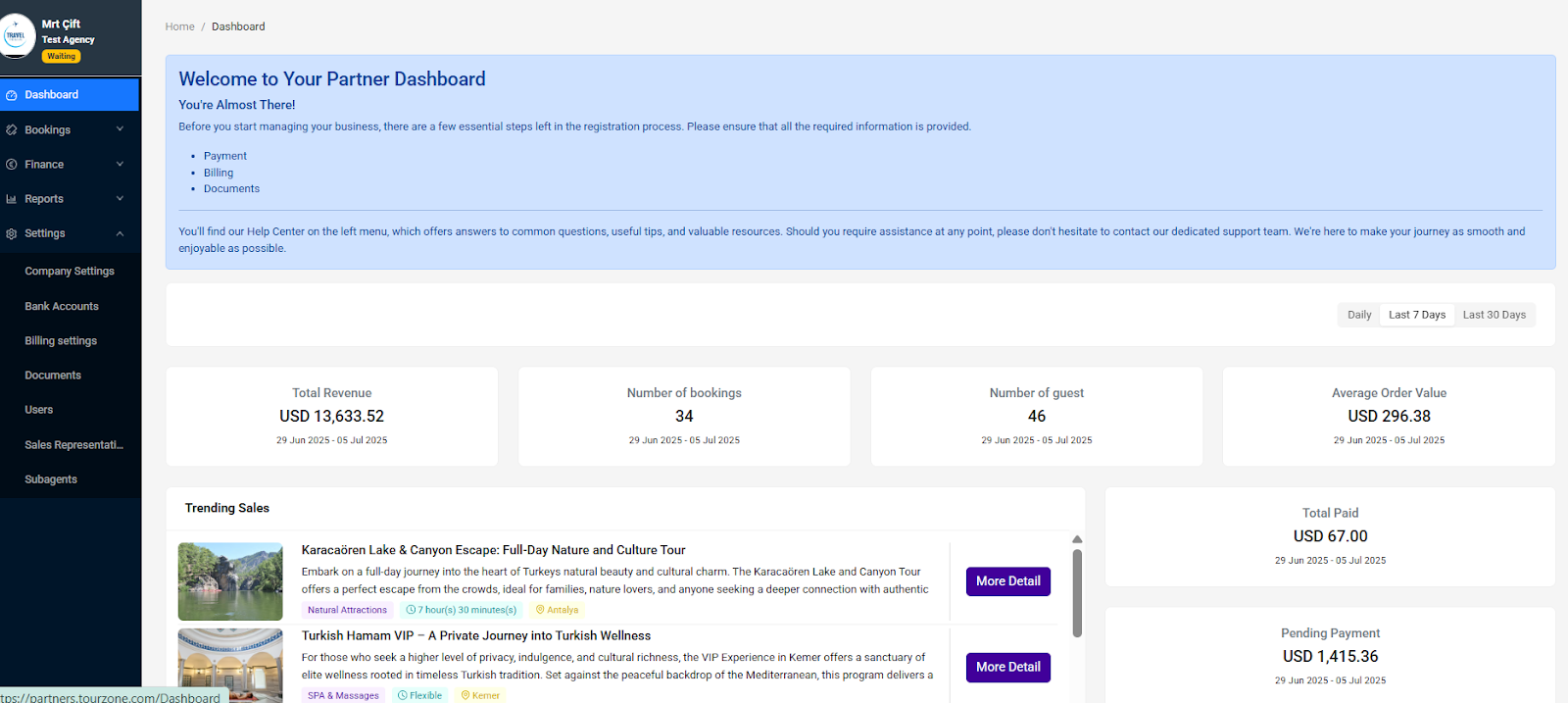
Dashboard for Agencies – Overview and Purpose
The agency dashboard in your Tourzone panel is your main tool for monitoring sales performance, active bookings, finances, and tour popularity. All key metrics are displayed in one place and updated in near real time.
Key Performance Indicators (KPI):
At the top of the screen, you’ll find a summary of your key figures for the selected time period:
Total Revenue:
Total amount of sales from all bookings in the selected period.
Example: USD 102,092.52Number of Bookings:
Total number of confirmed bookings.
Example: 25 bookingsNumber of Guests:
Total number of travelers across all bookings.Average Order Value:
Average revenue per booking (Revenue ÷ Bookings).
Example: USD 4,083.70
Financial Section:
Total Paid:
Amount already paid to your agency in the selected period.Pending Payment:
Amount to be paid after tour fulfillment.
Example: USD 13,024.60Total Commission:
Total commission retained by the Tourzone platform.
Example: USD 13,024.60
Trending Sales:
This section highlights your best-selling tours. Each item displays:
Tour name
Category (e.g., “Historical Sites”, “SPA & Massage”)
Duration
Location
Short description
“More Detail” button to view or book
Example Tours:
Cappadocia Discovery: 2-Day Cultural & Scenic Journey
Echoes of Lycia: Kekova Sunken City & Ancient Limyra Tour
Healing Peloid Mud Hammam Experience in Antalya
Bookings:
The bottom of the dashboard lists all your bookings. You can filter by:
Fulfillment Date
Purchase Date
Status, Product, Package, Lead Travel, etc.
Each row includes:
Voucher
Fulfillment date
Status
Product name
Package
Responsible person (Lead Travel)
Click the icon to view booking details. You can also export the list to Excel for reporting.
Why is it important for agents?
This panel allows you to:
Monitor the success of campaigns and destinations
See which tours perform best
Track your payouts and commissions
React quickly to bookings and manage them effectively
Tourzone Dashboard – Overview for Resellers
The Tourzone reseller dashboard provides a complete overview of your agency’s performance and booking data. This panel is designed to help you track your sales activity, monitor financial transactions, and analyze top-selling products. Here's what you can see and manage:
Top-Level Metrics:
Total Revenue – Gross earnings from all bookings in the selected period.
Number of Bookings – Total number of confirmed bookings.
Number of Guests – Total guest count across all bookings.
Average Order Value – Average income per booking.
Total Paid – Amount already transferred to your account.
Pending Payment – Amount waiting to be processed after service fulfillment.
Total Commission – Commission earned from completed bookings.
Trending Sales Section:
View your best-performing tours and experiences.
Quickly identify which products are generating the most revenue.
Includes tags like category, duration, and location.
Booking Filters & Exports:
Filter bookings by Fulfillment Date or Purchase Date.
Use the search bar to locate a specific reservation.
Export booking data to Excel for internal tracking or reporting.
Was this article helpful?
That’s Great!
Thank you for your feedback
Sorry! We couldn't be helpful
Thank you for your feedback
Feedback sent
We appreciate your effort and will try to fix the article