Bank Accounts
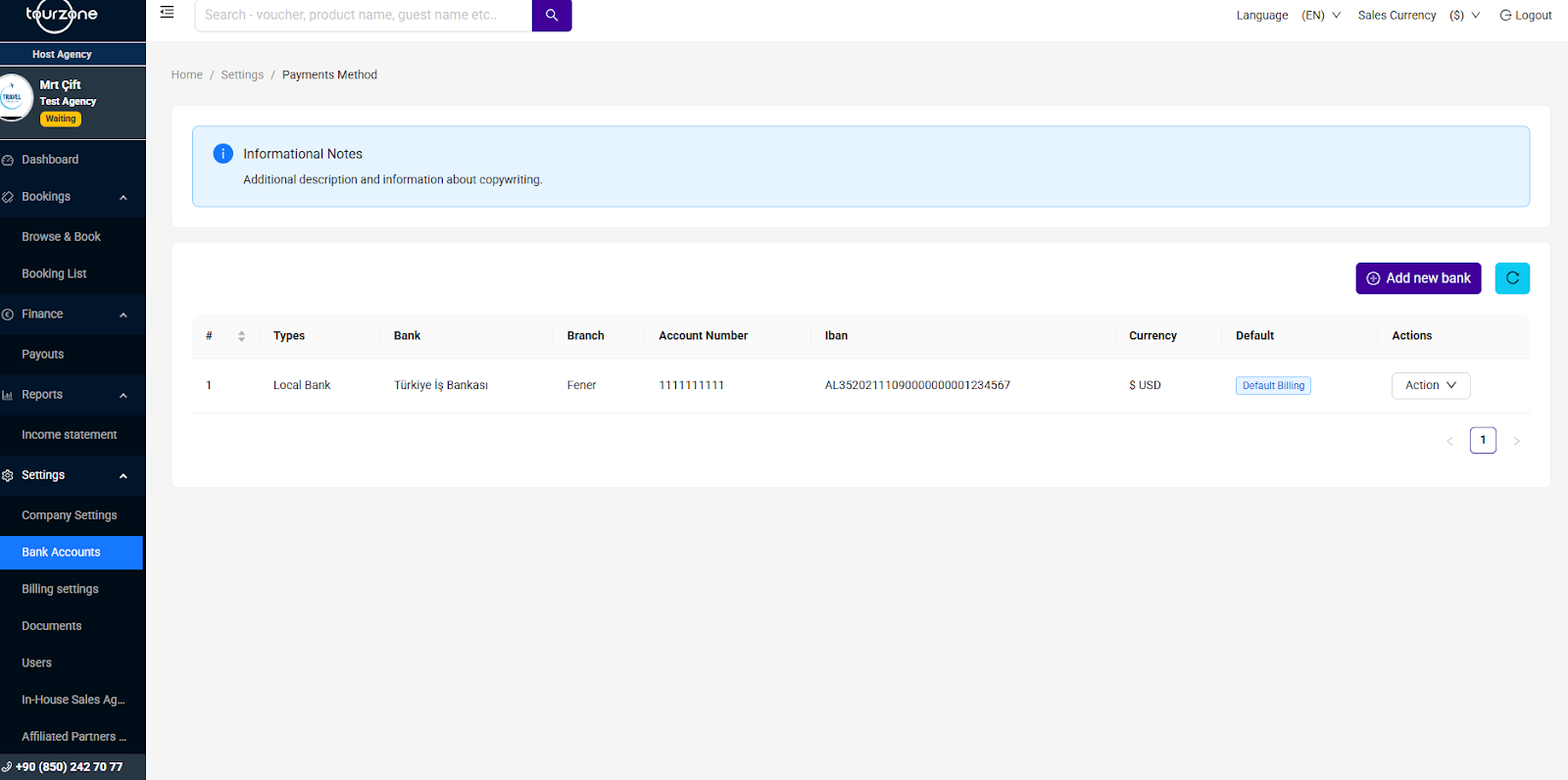
Managing your bank details accurately is essential to ensure smooth and timely payouts. Tourzone allows you to add multiple bank accounts and choose one as your default billing account. We highly recommend setting up three separate accounts for different currencies (e.g., USD, EUR, TRY), so your payments can be processed in the most efficient way.
Where to Find the Bank Account Settings
Go to the left-hand menu
Click Settings
Select Bank Accounts from the submenu
You will be taken to the Payments Method page, where your current accounts (if any) are listed.
How to Add a New Bank Account
To add a new bank account:
Click the “Add New Bank” button on the top right
Fill in the required fields:
Bank Name (e.g., Türkiye İş Bankası)
Branch Name (e.g., Fener)
Account Number
IBAN
Currency (USD, EUR, TRY, etc.)
Select “Set as Default Billing” if this is your primary payout account
Click Save
Tip: We recommend adding 3 bank accounts in different currencies to avoid conversion delays and optimize your international payouts.
How to Edit or Remove a Bank Account
To make changes to an existing bank account:
Locate the account in the table
Click the “Action” button
Select:
Edit – to update account details
Delete – to remove the account from your profile
You can only delete non-default accounts. If the account is set as default, you need to assign a new default before deleting it.
Tips for Best Performance
Always keep your IBAN accurate and up to date
Choose a currency that matches your sales payout to avoid unnecessary exchange fees
If you change your primary bank, don't forget to mark the new one as default
If you need further help or encounter issues updating your banking information, please contact our support team at [reseller.support@tourzone.com] or use the Help section in your dashboard.
Was this article helpful?
That’s Great!
Thank you for your feedback
Sorry! We couldn't be helpful
Thank you for your feedback
Feedback sent
We appreciate your effort and will try to fix the article