Location: Settings > Bank Accounts
To receive your payouts from completed bookings, you must add at least one valid bank account to your profile. Tourzone supports multiple currencies and allows you to manage several accounts from the Bank Accounts section.
Step-by-Step Guide
1. Go to the Bank Accounts Page
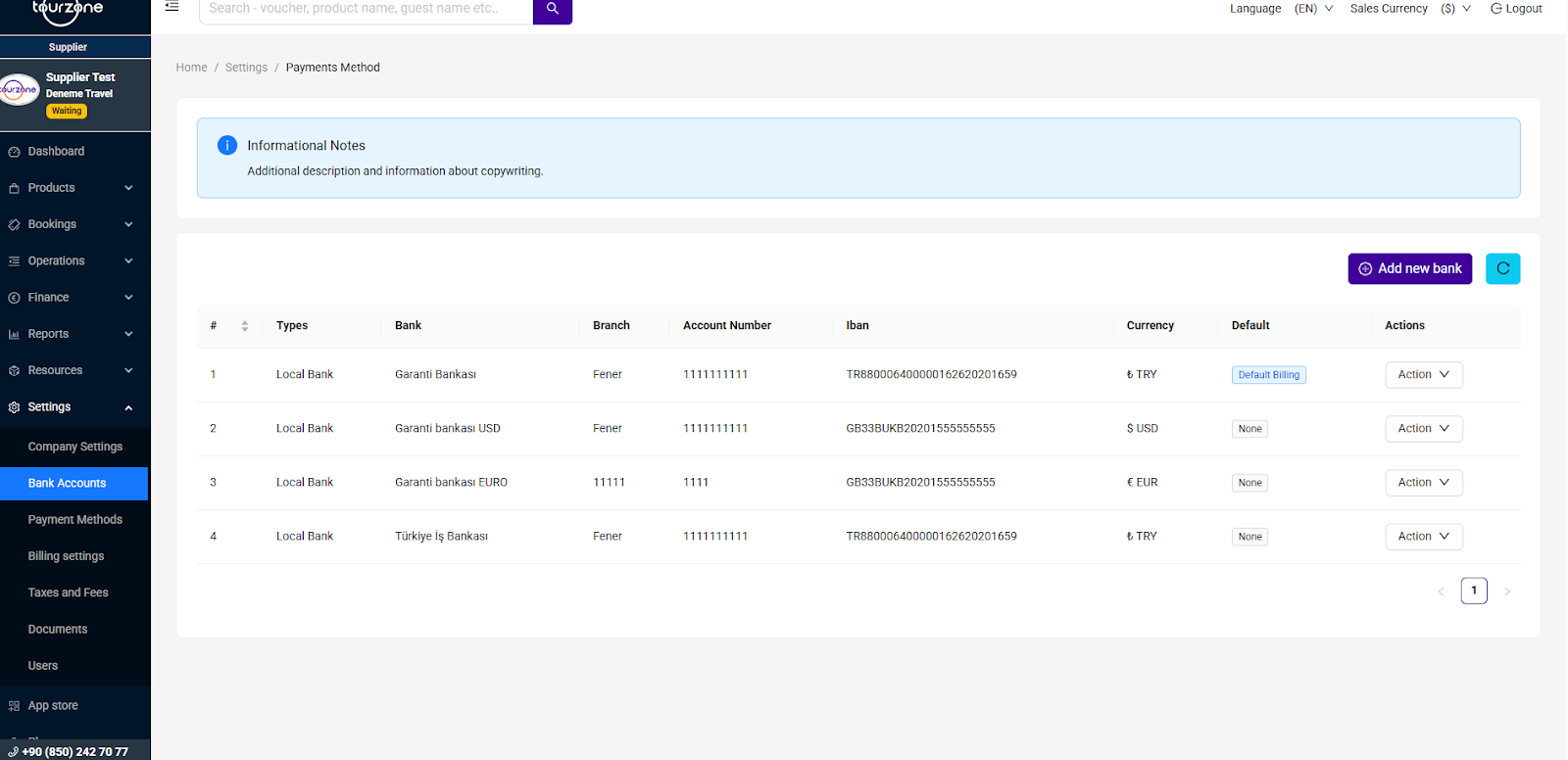
In the left-side menu, click Settings, then select Bank Accounts. You will see a list of all registered bank accounts connected to your profile.
2. Add a New Bank Account
Click the “Add new bank” button in the top-right corner. A form will appear to enter your bank details:
Bank Name – Select or type the full name of your bank (e.g., Garanti Bankası)
Branch – Name of your bank’s branch (e.g., Fener)
Account Number – Your full account number
IBAN – International Bank Account Number (e.g., TR880006400000162620201659)
Currency – Choose between TRY, USD, EUR depending on your preferred payout currency
After entering all the information, click Save to register the account.
Managing Multiple Bank Accounts
You can register multiple accounts in different currencies. This helps you receive payouts in the most suitable currency for each booking.
Each account line will show:
Bank Name & Branch
Account Number & IBAN
Currency
Default Billing Account tag (if selected)
Setting a Default Payout Account
Only one bank account can be set as your Default Billing account. This is the primary account used for payouts unless specified otherwise.
To assign it:
Click on the “Action” dropdown next to the account you want
Select “Set as Default”
This will mark it with a Default Billing tag in the table.
You can change the default account anytime by repeating this step.
Actions Available per Account
Under the Action menu for each account, you can:
Edit account information
Delete an account (if it’s not the default account)
Set as Default
Deleting your only account will stop payouts until a new one is added.
Important Notes
Ensure your IBAN is correct and matches the currency type
Tourzone will use your default account for scheduled payouts
Incorrect or incomplete bank data may delay your payment
Was this article helpful?
That’s Great!
Thank you for your feedback
Sorry! We couldn't be helpful
Thank you for your feedback
Feedback sent
We appreciate your effort and will try to fix the article