Booking Panel – Guide for Agencies
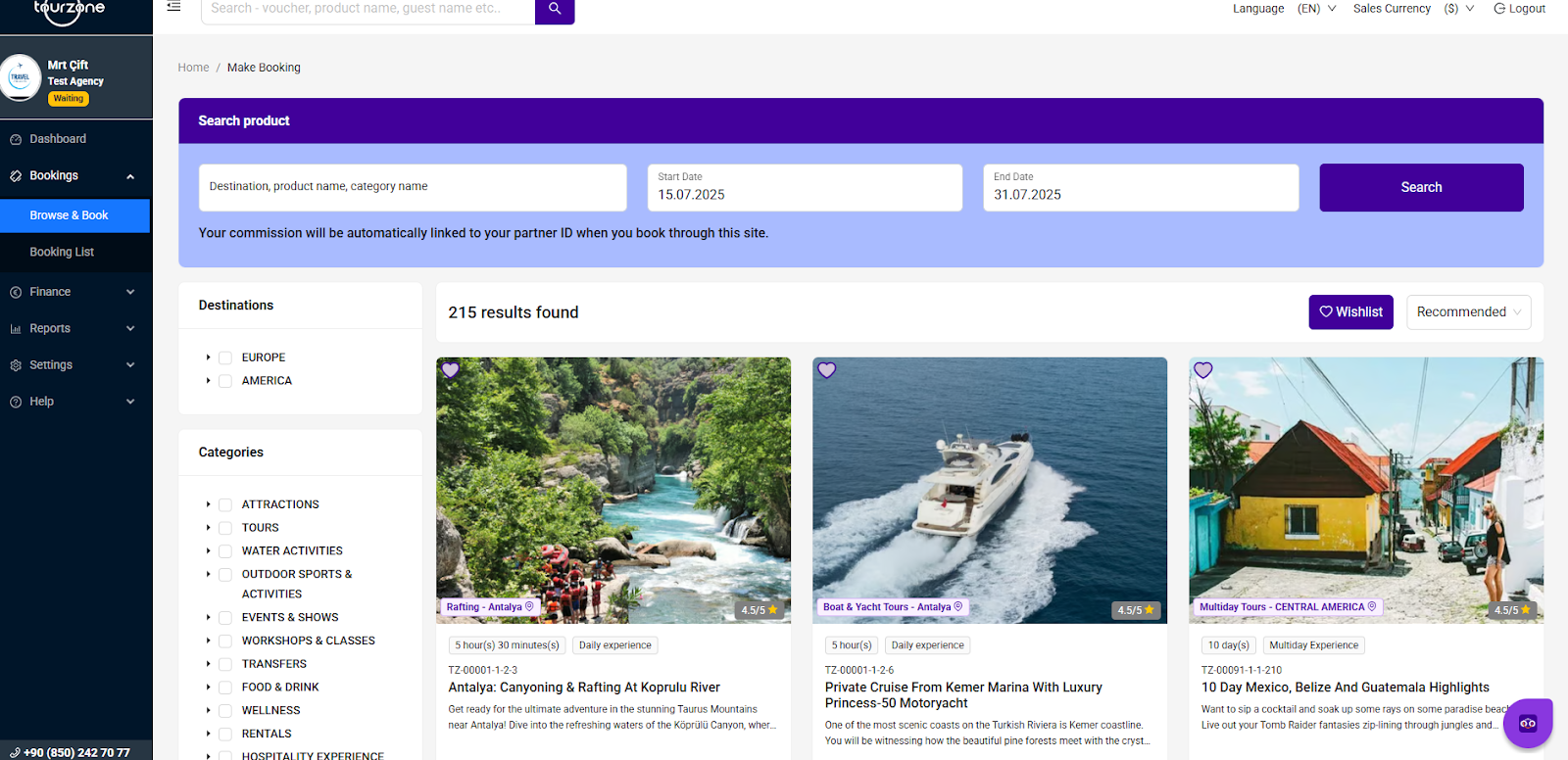
The Booking Panel in Tourzone is your main tool to search, filter, and book tour products efficiently. It provides agencies with a visual and functional interface to browse through a wide catalog of experiences, set date ranges, and apply filters for destination and category.
Search and Filter:
Search bar: Enter product name, destination, or category.
Start and End Date: Choose travel dates to see available tours.
Commission Note: Your commission is automatically linked to your partner ID — no manual input needed.
Categories and Filters:
Use the left-side menu to narrow down results by:
Destination: Europe, America, etc.
Category: Adventure, historical tours, boat trips, culinary, SPA, transfers, etc.
Tour Preview:
In the center of the page, you’ll see tour result cards with:
Tour Title and Description
Location Tag (e.g., Rafting – Antalya)
Duration: e.g., 5 hours 30 minutes
Commission Rate: e.g., 20%
Price: e.g., From $58.02
Rating: Out of 5 stars
Add to Wish list: Heart icon to save favorite products
Tour Code: Reference number for tracking and booking
❤️ Wish list and Sorting Options:
“Wish list” button lets you save preferred tours.
“Sort by” menu allows sorting by “Recommended”, “Price”, or “Popularity”.
Why It Matters for Agencies:
Through this panel, you can:
Discover top-selling and high-commission tours
Book quickly based on customer dates and interests
Access full product details for customer presentation
Compare tour content and pricing easily
Was this article helpful?
That’s Great!
Thank you for your feedback
Sorry! We couldn't be helpful
Thank you for your feedback
Feedback sent
We appreciate your effort and will try to fix the article